
Picture an auditor asking in March how a June event on Compressor 2 was closed. On that June morning, the historian showed the pressure dropping at 06:10, and a survey flagged the site half an hour later. The maintenance system had a seal repair on the same unit from four months before. How the event was closed lives in a spreadsheet that a production engineer started by hand before the 7 a.m. call.
That’s what the system of action vs system of record question is about. Each system was right about its own piece. Putting the pieces together was a person’s job, and someone does it again for the next event, and again when the next question comes.
Key takeaways
- A system of record is right about one kind of fact.
- A system of action reads those records where they are, puts each signal on its asset, and drafts the next step for a person to approve.
- The asset model and the decision history belong to the operator.
What is a system of record?
A system of record is the trusted store for one kind of fact. The historian keeps what each sensor read. Work done on each asset lives in the maintenance system, and the ERP keeps what it all cost. Most operators run several of these.
Production accounting, the detection program and the annual emissions inventory sit beside them. Each system of record was built to answer specific questions for the team that runs it. Auditors and finance settle disagreements from these records, so they are tightly controlled.
They also don’t agree on what to call anything. One compressor is a SCADA tag in the historian, a location code in the maintenance system, a cost code in the ERP, and a component ID in the survey inventory. Anyone who wants that compressor’s whole history has to look it up four times and line the answers up by hand. Operations, maintenance, finance and the detection team all ask about the same machine, and each one goes to its own system to do it.
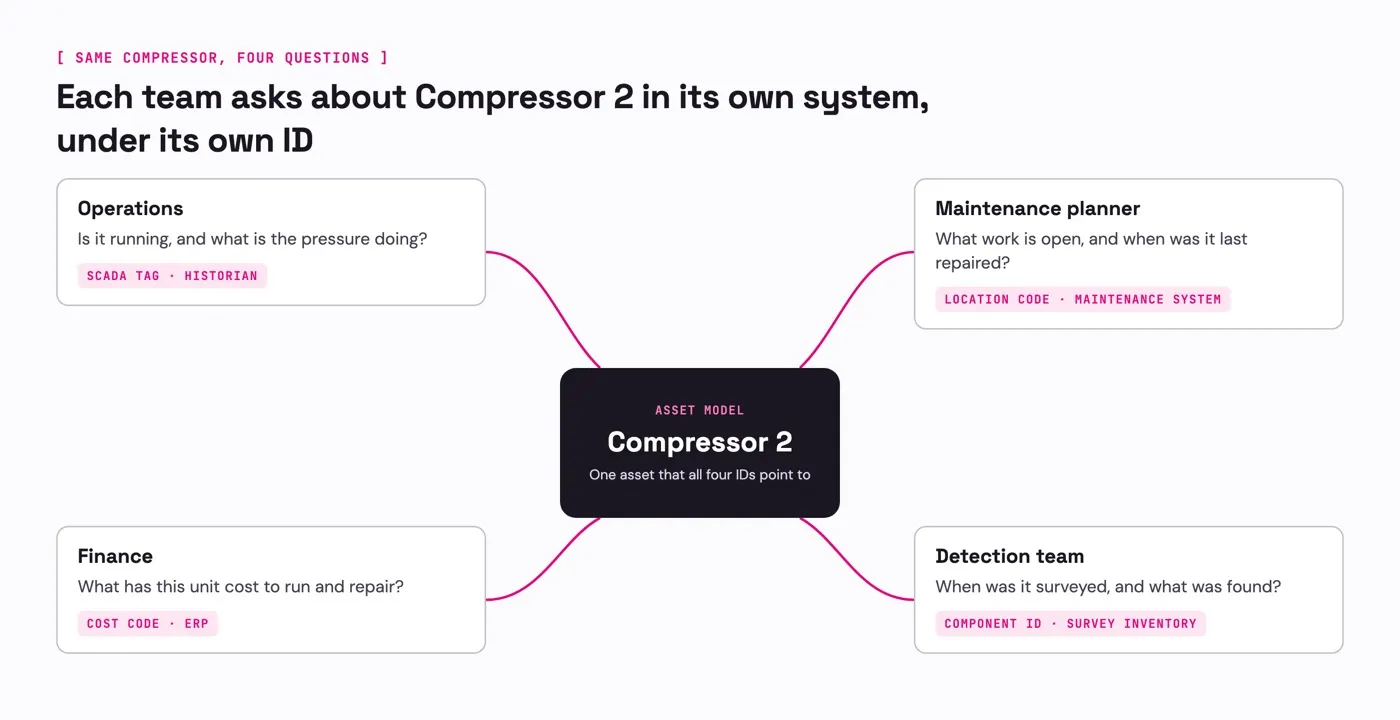
Operations, maintenance, finance and the detection team each know Compressor 2 by their own ID: a SCADA tag, a location code, a cost code and a component ID. The asset model points all four to one compressor.
What is a system of action?
A system of action uses the facts in an operator’s systems of record to get work done. Where a system of record answers “what is true?”, a system of action answers “what should happen next, and who signs off?” To do that, it pulls together the facts a decision needs and drafts the next step. A person approves it, and the decision history keeps what was done and why.
In practice, that starts with the asset. A signal is put on the asset it describes, with that asset’s readings, open work and repair history attached. On Compressor 2, the next step then depends on one check. If the pressure drop was a planned blowdown, the event closes with “planned blowdown” recorded as the cause, and nobody drives out. If it was not, the maintenance planner gets a drafted work order with the readings and the last seal repair attached. The LDAR workflow runs the same check on each detection and keeps a scheduled vent off the dispatch list.
Either way, the record says which it was, a planned blowdown or a fault with the work order sent to fix it. It sits next to the readings, and the auditor finds it there in March.
Without one, people rebuild events by hand
When nothing does that assembly, people do it. The time goes to five places.
- Rebuilding. The compliance team pieces the same events together again for the annual report, and again whenever an auditor asks.
- Retyping. Alerts arrive by email, and someone types each one into a tracker. Every retyped field is a chance for a wrong asset ID.
- Duplicates. One event shows up in several vendor portals, and someone has to notice it is one event.
- Hunting. The readings, open work and repair history sit in different systems, so someone goes and gets them.
- Second trips. A crew drives out to a planned event, or arrives without what it needs.
Two studies found most data goes unused
In 2015, McKinsey looked at how companies use data from connected sensors. In “An executive’s guide to the Internet of Things”, Jacques Bughin, Michael Chui and James Manyika report that “only 1 percent of the data from the 30,000 sensors on a typical oil rig are used.” The little that was used did not go into optimization, prediction or data-driven decisions.
Five years later, a broader study found the same pattern outside oil and gas. In 2020, a Seagate report based on an IDC survey of 1,500 enterprise leaders found that 68 percent of the data available to businesses isn’t put to work.
Neither figure describes any one operator today. They give a sense of scale, and the pattern is the one in the Compressor 2 story: the reading exists, and the context to act on it sits in another system.
Records stay separate because they run at different speeds
Records update at different speeds because they serve different jobs. The ISA-95 standard for connecting plant and business systems describes the levels: control systems react in fractions of a second, operations management works anywhere from days down to seconds, and business planning works in days, weeks and months. The OPC Foundation reference lists each level’s time horizon.
One event on Compressor 2 crosses all of them, from a pressure reading that changes in seconds to an annual report filed months later. A single system built for one of those speeds would serve the other teams badly. That is why each team keeps its own record, and why a system of action leaves those records in place and works across them.
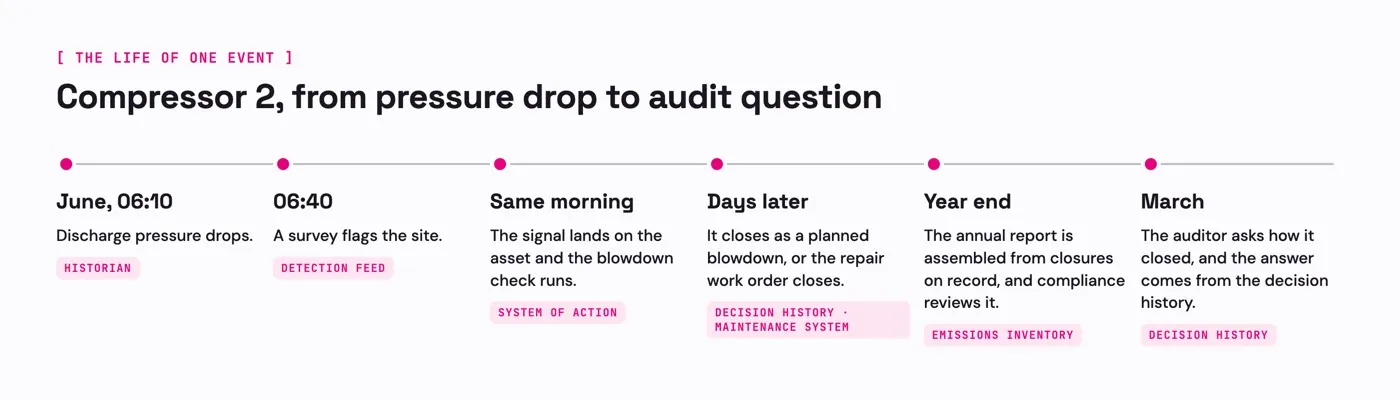
One event moves at several speeds. The pressure drops at 06:10 in June and a survey flags the site at 06:40. The event closes days later, the annual report is assembled at year end, and the auditor’s question is answered in March from the decision history.
A system of action reads your records where they are
For IT, the work is connecting the systems where the facts live. SensorUp, an industrial system of action, reads SCADA historians such as PI and CygNet over OPC-UA and Modbus. It also reads SAP, Maximo, continuous monitors, and satellite and OGI surveys, where they are. Each one stays the authority for its own facts. Approved work orders go back to the maintenance system, in SAP or Maximo.
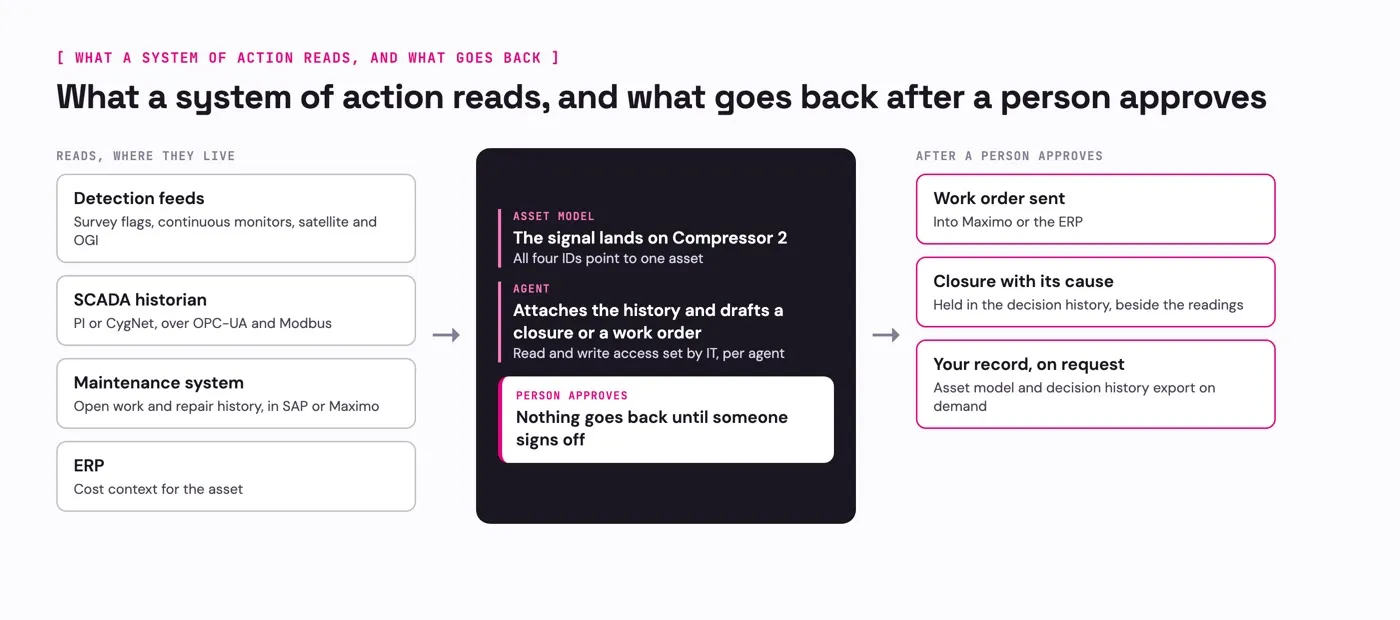
SensorUp reads detection feeds, historians, the maintenance system and the ERP where they live. An agent drafts a closure or a work order, and a person approves it. Only then does the work order go to the maintenance system and the closure into the decision history.
Alongside those systems, SensorUp holds two things. The first is an asset model. It ties the SCADA tag, the location code, the cost code and the component ID to one compressor, so a signal on any of them lands in the same place. SensorUp sets it up with the operator’s team, at whatever detail the operator has today, from a list of facilities to every valve.
The second is a decision history: for each signal, what was flagged, what was attached, who approved it and how it closed. That is what the auditor reads in March. The operator owns both the asset model and the decision history, and both export on demand with the rest of the operational record.
IT reviews SensorUp Studio once, for everything built in it. IT also sets what each agent can read and write. After that, the people who run each program change their own workflows in Studio. When a new use case needs a record that is not connected yet, SensorUp connects it with the operator’s team. The next use case does not mean buying another tool.
Agents sort and draft, and a person approves
Agents do the sorting and drafting. An agent can match a signal to its asset, pull the asset’s history, and draft a closure or a work order. Nothing an agent drafts reaches the maintenance system, and no reporting period closes, until a person approves it.
A team can build the same pattern in Studio for equipment problems. Say a compressor is running degraded. Discharge pressure sags, runtime climbs to hold throughput, and the unit moves less gas than it should while its work order sits open. An agent in that workflow can put those signals on the compressor and draft a choice for the production engineer and the maintenance planner: expedite the work order, or schedule a shutdown.
At year end, an agent can assemble the report figures from closures already on record. The compliance team reviews them before anything is filed.
What SensorUp publishes for a security review
SensorUp publishes these for a security review.
- Certifications. SOC 2 Type II, monitored continuously with Vanta, and ISO 27001, on the security page.
- Hosting and data. Amazon Web Services, with data encrypted in transit and at rest, and controls from multi-factor authentication to logging, access monitoring and backups.
- Agent access. Read and write access is set for each agent, one domain at a time, as the Studio page describes.
- Network. SensorUp pulls from the historian, so nothing new lands on the OT network.
Bring the rest to the review. That includes how agents handle data, where agent reasoning runs, data residency and single sign-on. It also includes the access SensorUp needs on the historian, the write path into SAP or Maximo, and who maintains the connectors through an upgrade.
System of action vs system of record, side by side
| Compare | System of record | System of action |
|---|---|---|
| Answers | “What is true?” for one kind of fact | “What should happen next, and who signs off?” |
| Holds | One kind of fact: readings, work, spend or detections | The open event on one asset, with its readings, open work and repair history |
| Knows an asset by | Its own ID: a SCADA tag, a location code, a cost code or a component ID | One asset that all of those IDs point to |
| Updates | At its own speed, from fractions of a second to year end | When a signal lands on an asset |
| Used by | The team that set it up | The teams that act on the asset: operations, maintenance and compliance |
| A person’s role | Enters and corrects the data | Approves the drafted next step |
| Produces | A stored value | A closure that records the cause, such as a planned blowdown, or a drafted work order |
| Keeps on record | The values it stores | What was flagged, what was attached, who approved it and how it closed |
| Changed by | A software project | The program owners, inside the access IT sets |
| Examples | Historian, maintenance system, ERP, production accounting, emissions inventory | Deciding which detections need a crew, assembling the year-end report from closures, and workflows a team builds in Studio, such as one for a degraded compressor |
Survey correlation became one operator’s main way to close events
One upstream operator runs SensorUp. These are operations results, measured across 2025 and 2026.
- Closure path. Correlating a field or OGI survey to detection data became the majority closure path, up from roughly 40% of closures to over half. Where the survey was already going to happen, the correlation closed the event and no field crew was sent to investigate.
- Speed to close. Median time to close an emission event fell 4x. Matched February to July windows in both years gave a similar drop.
- Slowest cases. The slowest closures went from triple-digit days to about twenty.
Across SensorUp deployments (program scope, not this operator’s results): 20,000+ assets · several thousand facilities · 1,000+ continuous data streams
Questions
Common questions
What is a system of record example?
The annual emissions inventory is one. Once the period closes, its figures are locked, and the auditor reads the locked version. A well and facility master is another. It lists which assets exist and what they are called.
What is the difference between a system of record and a source of truth?
A system of record is where a fact is first written and kept, such as a reading in the historian. A source of truth is the place people agree to read from, and it often pulls from several systems of record. That's a separate question from system of record vs system of action. A system of action reads from the records and keeps a history of what was decided about them.
Does a system of action replace the historian or the maintenance system?
It doesn't replace either one. A system of action reads the historian and the maintenance system where they are, and each stays the authority for its own facts. Approved work orders go back to the maintenance system, in SAP or Maximo.
Who owns the asset model?
The operator does. The asset model and the decision history both belong to the operator, and both export on demand with the rest of the operational record.
Start with one output and the records it reads
- List your records. Write down which system is the authority for readings, work, spend and detections, and the ID each one uses for the same compressor.
- Pick one output. Choose one that needs most of those records, such as which detections need a crew this week, or one figure from last year’s report with its evidence.
- Connect what it needs. Connect only the records that output reads. The next use case adds its own.
Bring that list, or the one output, to a working session. A SensorUp engineer walks through what the platform would read from and write back to each of your systems. From there, SensorUp’s team can scope a first working prototype with you on a representative sample of your data. It isn’t a production deployment, and your architect is welcome.